
Starter
See what matters. Build healthy habits with simple visibility.
- Live location for 1 child
- Location history - last 24 hours
- 2 safe places with arrival alerts
- Low-battery alerts
- Family chat
- Alarms
- Daily screen time limit - 1 schedule
- Installed apps list - view only
- Weekly screen time summary
Not Included
- SOS emergency workflow
- No-show alerts
- Attention Mode / Phone Lock
- Internet filters + SafeSearch
- App blocking & website blocker
 Family
Everything you need to keep your family safe — real-time location tracking, detailed usage insights, and advanced parental control features.
 LOCATION & SAFETY
- Live location - unlimited children
- Location history - 30 days
- Unlimited geofences — arrival & departure alerts
- SOS emergency workflow
- Location history - 30 days
- No-show alerts
 CONTROLS & BLOCKING
- Attention Mode / Phone Lock
- Internet filters + SafeSearch
- App blocking & website blocker
- App approval flows
- Unlimited schedules & per-app limits
 INSIGHTS & COORDINATION
- Real-time usage reports
- Full app & phone usage breakdown
- Tasks and rewards
- Family chat
- Alarms
- Family calendar Coming Soon
 No credit card
 Cancel anytime
 Available on Android & iOS
What you unlock with Family
Go beyond daily awareness — full protection and real-time control for every child, every day.
Be ready before something goes wrong
SOS, no-show alerts, and departure geofences mean you're informed the moment plans change — not after.
Understand patterns, not just moments
Real-time usage reports and full app breakdowns give you the context to have calm conversations — not reactive ones.
Set it once, adjust as they grow
Unlimited schedules, per-app limits, and flexible controls that evolve with your child's age and your family's routines.
One plan. Every child. No extras
$7.99 covers your whole family — no per-child pricing, no add-ons, no surprises.
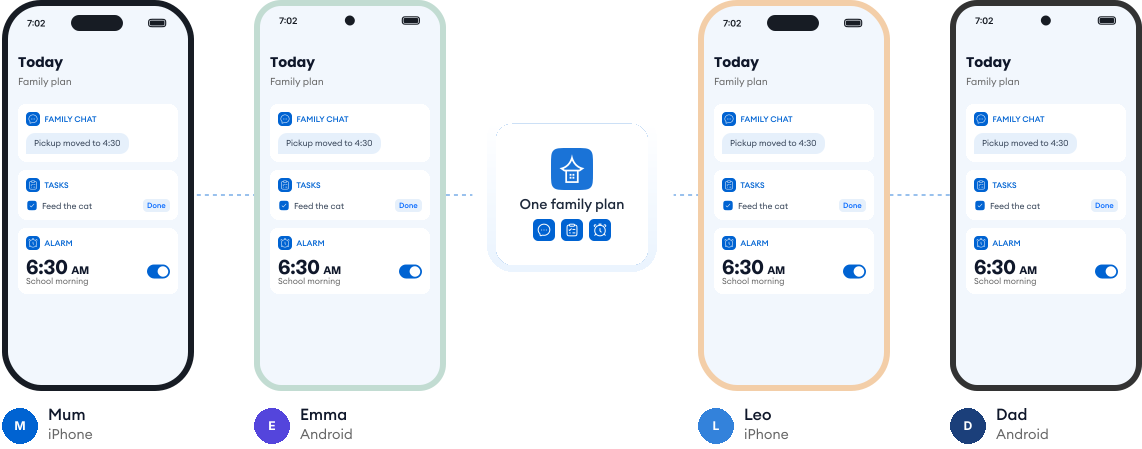
Works on every phone in your family.
Most families use a mix of phones. Kupola works across iPhone and Android, so everyone stays on the same page, and you always see what's available on each child's phone.
Loved by families for harmony.
Real reviews from parents using Kupola day to day.
Sarah M. Mom of two
I finally feel in the loop without checking every little thing. Kupola gives me the right updates at the right time.
Michael R. Dad of a teen
The setup was simple, and the routines actually stuck. It makes expectations clearer for everyone.
Jessica B. Mom & co-parent
We don’t always have the same schedule, but Kupola helps us stay on the same page without extra back-and-forth.
Chris T. Dad of a middle-schooler
I like that it focuses on patterns instead of constant monitoring. It gives me something useful to act on.
Amanda L. Parent of two
The controls are easy to understand, and my kids know what to expect. It’s brought a lot more consistency to our days.
Brian W. Guardian of a teen
I wanted something practical, not intrusive. Kupola gives me the important alerts while still giving them room to grow.
Sarah M. Mom of two
I finally feel in the loop without checking every little thing. Kupola gives me the right updates at the right time.
Michael R. Dad of a teen
The setup was simple, and the routines actually stuck. It makes expectations clearer for everyone.
Jessica B. Mom & co-parent
We don’t always have the same schedule, but Kupola helps us stay on the same page without extra back-and-forth.
Have a question?
Everything you need to know about how Kupola works, what it does, and how you stay in control.
What’s the difference between monthly and annual plans?
Both plans include the same Family features. Choose monthly for flexibility, or annual to save more with one upfront payment for the year.
When should I upgrade to Family?
Upgrade when you need advanced controls, alerts, reports, or support for multiple children.
Is there a free trial for Family Plan?
Yes, 7-days free trial period is available for Family Plan.
Do both the parent and child apps require payment?
No. One Family subscription covers the parent app and all child devices.
Does $7.99 cover all my children?
Yes. One Family plan covers your entire family, with unlimited child profiles.
Can I cancel anytime?
Yes. You can cancel your Family subscription anytime.
Privacy-first by design.
We prioritize privacy with GDPR and COPPA compliance, strong security practices, and clear controls that keep families in charge.

Compliance you can trust
Built with GDPR and COPPA requirements in mind to protect families and children’s data.

Encryption for sensitive data
Data is protected with encryption to reduce the risk of unauthorized access.

Access stays in your family
Child information is only visible to approved parents/guardians in your Kupola family.

Control anytime
Adjust what’s shared, change settings, and manage permissions whenever you need.

Data minimization
We collect only what’s necessary to deliver family safety, routines, and insights.

Clear retention & deletion
Manage history and request deletion when you no longer need the service.
